




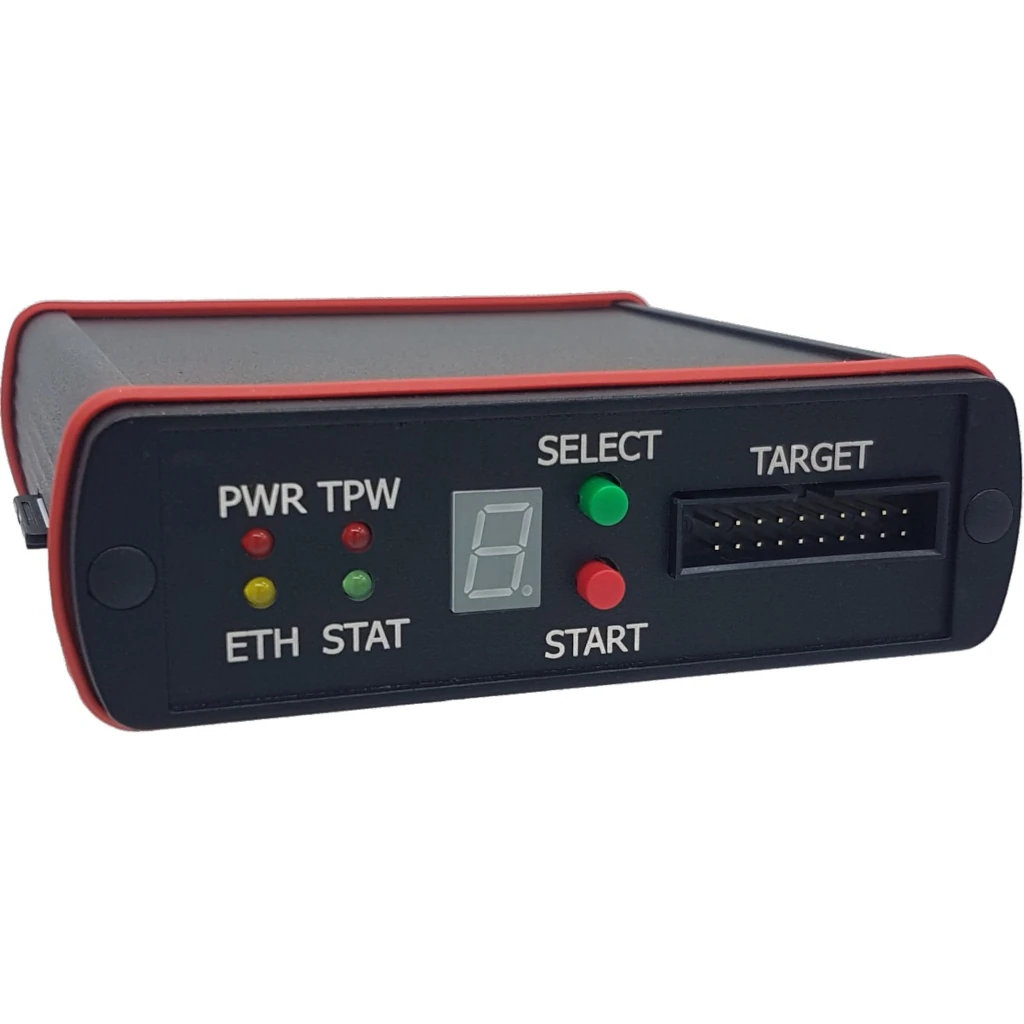
Ronetix PEEDI is a JTAG, SWD and BDM emulator and flash programmer that sits on your Ethernet network and talks GDB. Its standout capability is Linux kernel and driver debugging: with the MMU enabled, you can stop the kernel, set breakpoints in a driver and see every thread, from Eclipse or any GDB front end. The same box programs NOR, NAND, SPI flash and eMMC, at a desk or standalone on a production line. Pertech is a Ronetix distributor.
What are the key features and capabilities of PEEDI?
- Linux kernel, driver and application debugging over GDB, also with the MMU enabled
- OS awareness (“info threads”) for Linux, uClinux and eCos
- Hardware and software breakpoints; target reset control and remote reset detection
- Works with Eclipse, Insight, ddd and any GDB remote-protocol debugger
- Arm (Cortex-A, Cortex-R, Cortex-M, ARM7/9/11, XScale), Power Architecture, ColdFire, Blackfin, MIPS and AVR32
- Built-in flash programmer for NOR, NAND, OneNAND, SPI flash, eMMC, EEPROM and FPGA/CPLD
- Standalone mode: up to 15 images on an SD card, selected on the front panel
- Ethernet connection, so a target in the lab can be debugged from anywhere on the network
How Linux kernel debugging with PEEDI works
Connect PEEDI to the target’s JTAG or SWD header and to your network. PEEDI initializes the processor on power-up or reset and acts as a GDB server over Ethernet. Point GDB or Eclipse at PEEDI with your kernel’s vmlinux symbols, and you can halt the kernel, step through driver code, inspect memory and list threads. Because PEEDI handles debugging with the MMU enabled, you can follow code after the kernel turns on virtual memory, which is where many board bring-up problems hide.
What are the primary use cases and applications for PEEDI?
- Board bring-up: U-Boot, device tree and early kernel boot
- Linux driver development and kernel crash analysis
- RTOS and bare-metal debugging on Cortex-M and Cortex-R MCUs
- Production programming of flash and eMMC without a PC
- Remote labs, where targets sit in another room or site
Key Specifications
| Spec | Value |
|---|---|
| Model | PEEDI JTAG/SWD/BDM Emulator and Flash Programmer |
| Interfaces | JTAG, SWD, BDM |
| Debugger | GNU GDB remote protocol: Eclipse, Insight, ddd; OS awareness for Linux, uClinux, eCos |
| JTAG/BDM clock | Up to 33 MHz JTAG (22 MHz BDM), adaptive clocking |
| Target voltage | Autosense, 1.2 V to 5 V |
| Host connection | Ethernet 10/100BASE-T; RS232 for setup |
| Flash devices | NOR (with and without CFI), SPI NOR and SPI DataFlash, NAND with various ECC methods, OneNAND, MMC/SD and eMMC, I2C EEPROM, FPGA/CPLD (JBC player), on-chip flash of many MCUs |
| Image sources | TFTP, FTP or HTTP server, or the MMC/SD card |
| Control | Telnet or serial command line, TCL scripts, front panel |
| Multi-target | Up to 4 target boards per adapter with a multi-programming license |
| Front panel | 2 buttons and a 7-segment LED; status LEDs for power, target power, Ethernet and JTAG/BDM |
| Image storage | MMC/SD card, up to 15 images selectable on the front panel |
| Power | 5 V / 1 A; 6.9 V overvoltage shutdown |
| Case | Aluminium, 115 x 105 x 34 mm, 270 g |
| Warranty | Hardware 3 years, software 1 year |
Frequently asked questions
What is PEEDI?
PEEDI (Powerful Embedded Ethernet Debug Interface) is a Ronetix JTAG, SWD and BDM emulator and flash programmer. It connects to your network over Ethernet and serves GDB, so you can debug and program embedded targets from any PC on the network.
Can PEEDI debug the Linux kernel and drivers?
Yes. PEEDI supports Linux kernel and application debugging through GDB, also when the MMU is enabled, with OS awareness (“info threads”) for Linux, uClinux and eCos. You can set hardware and software breakpoints in kernel code and drivers.
Which debuggers work with PEEDI?
Any GNU GDB based debugger using the GDB remote protocol, including Eclipse, Insight and ddd. Ronetix also provides pre-built GNU cross toolchains.
Which processor families are supported?
Arm (ARM7, ARM9, ARM11, XScale, Cortex-M0 to M33, Cortex-R4F, Cortex-A5 to A72 including 64-bit Armv8), Power Architecture (MPC5xxx, QorIQ, including 64-bit e5500 and e6500), ColdFire, Analog Devices Blackfin, MIPS32, MIPS64 and AVR32.
Can it program flash without a PC?
Yes. Store up to 15 images on the MMC/SD card, pick one on the front panel and PEEDI programs the target on its own, optionally as soon as it detects target power. This makes it a production-line programmer as well as a debugger.
Can I debug or program several boards at once?
Multicore CPUs are supported without an extra license. Working on multiple boards at once needs an extra license and a multicore adapter, which controls up to 4 target boards.
Which JTAG adapter do I need?
It depends on your target connector. Ronetix makes adapters for ARM-20, ARM-14, Cortex-20, Cortex-10, TI-14, COP-16, Nexus-14, BDM-26, Blackfin-14, MIPS-14 and AVR32, plus 4-target multicore adapters. Pertech will help you choose.
What is the difference between the Emulator and the Flash Programmer?
The Flash Programmer has the same hardware and flash features but no source-level debugger support. It can be upgraded to the Emulator and Flash Programmer at any time. See the PEEDI JTAG/SWD/BDM Flash Programmer.
Where can I buy PEEDI in Israel?
Pertech is a Ronetix distributor in Israel. Contact Pertech for a quote, the right adapter for your target and technical support. PEEDI carries a three-year hardware warranty and a one-year software warranty.
Related Ronetix products at Pertech
- PEEDI JTAG/SWD/BDM Flash Programmer
- iMX7-CM SoM with NXP i.MX7D
- RNX-OSM-CARRIER v2.0 board (JTAG/SWD header)
- RNX-iMX93-OSM SoM with NXP i.MX93
- Ronetix products at Pertech
Bringing up a Linux board? Contact Pertech for a quote, the right JTAG adapter or a demo.
