




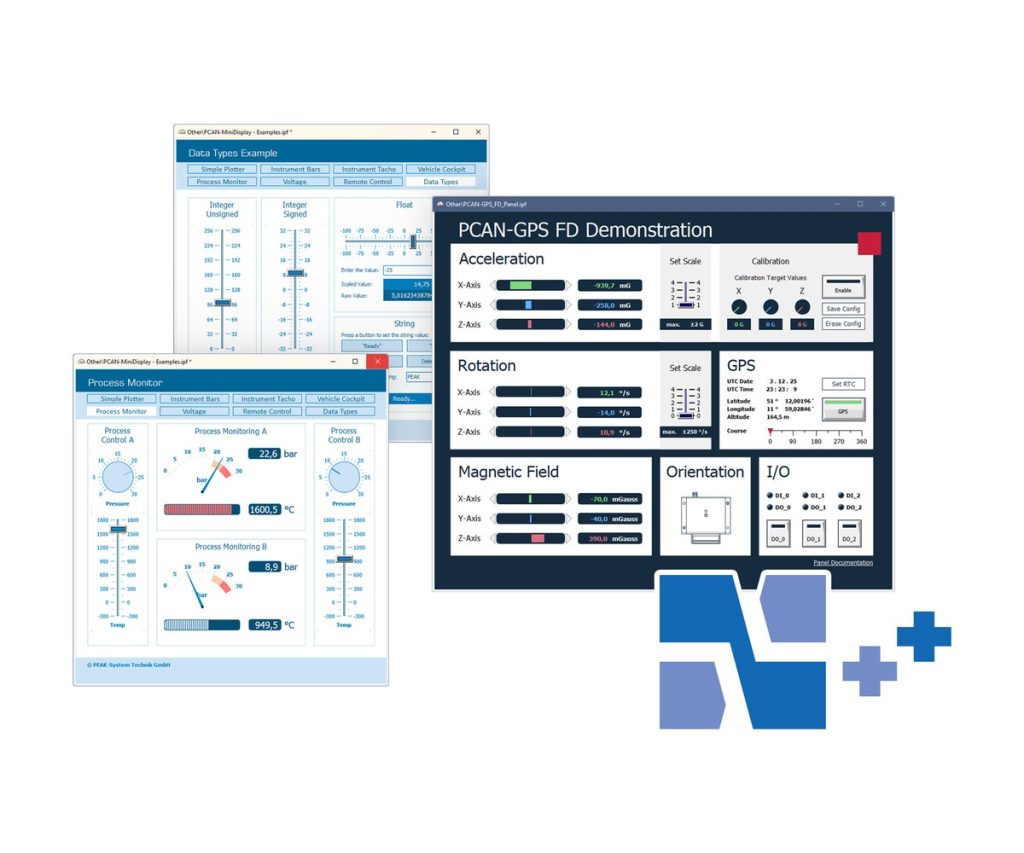
PCAN-Explorer 7: Instruments Panel Add-in
Turn PCAN-Explorer 7 into a custom CAN dashboard, test panel or simulator
This add-in adds a panel editor to PCAN-Explorer 7 where you place gauges, indicators and controls. Signals from received CAN messages drive the displays, and switches, sliders, potentiometers and input fields send messages onto the bus.
Use it for simple simulations, test bench front panels or monitoring screens. Version 7 adds SVG image lists for drawing your own instruments, and panels can switch between layouts (scenes) depending on signal values.
Highlights
- Analog and digital instruments fed by CAN signals
- Controls and input fields that generate CAN messages
- Own graphical instruments from image lists, including SVG since version 7
- Scenes: different panel layouts selected by signal value at runtime
- Automation through the panel object model with COM and scripts
Order numbers
- IPES-007088: Single user licence
- IPES-007288: Floating licence
Panel editing
- Drag and drop or numeric positioning
- Configure several elements at once in the property window
- Shape elements: squares, rectangles, circles and ellipses
- Save and load complete panel configurations
Requirements
- PCAN-Explorer 7 with a matching licence
- Windows 11 (x64/ARM64) or Windows 10 (x64), as for PCAN-Explorer 7
Key Specifications
| Spec | Value |
|---|---|
| Order number | IPES-007088 (single user), IPES-007288 (floating) |
| Base product | PCAN-Explorer 7 with matching licence (required) |
| Function | Signal display and CAN message generation |
| Licence | Single user or floating |
| Delivery | Download |
In the Box
- Licence (single user or floating)
- Installation files for the Instruments Panel Add-in
- Documentation in HTML help format
An add-in only runs inside PCAN-Explorer 7, so you need a PCAN-Explorer 7 licence of the matching type (single user or floating). It is also part of the PCAN-Explorer 7 Full Bundle. Other add-ins for PCAN-Explorer 7: Plotter Add-in, Bus Descriptions Add-in, J1939 Add-in.
For quantities, lead time or a quote, contact Pertech.
