



CANsub.4: Four-Channel CAN FD Interface over USB and Ethernet
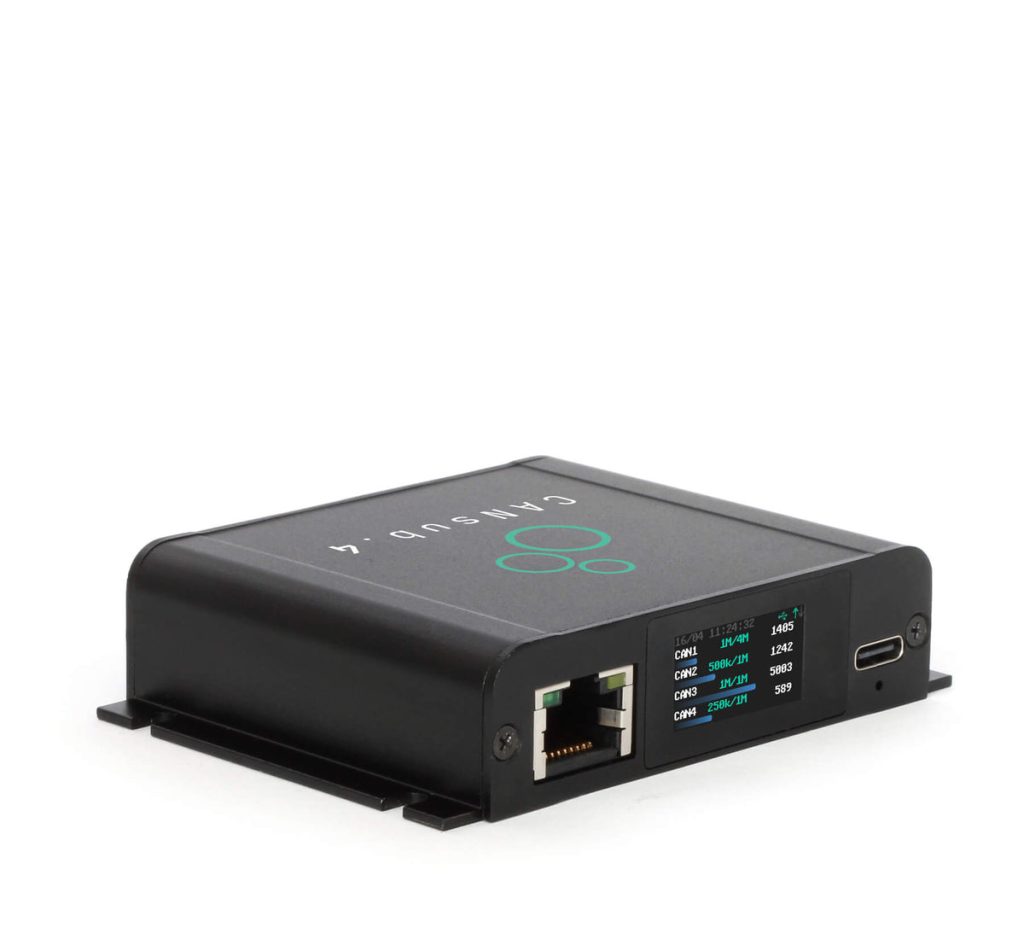
The CANsub.4 gives one PC, server or test script live access to four CAN or CAN FD networks at once, in a palm-sized aluminium box. It is built for gateways, vehicles and machines with several buses, and for test benches where you want to watch every network side by side.
It works over USB for a laptop on the desk, or over Ethernet as a shared network device. The webCAN app runs on the interface, so a browser is all you need to stream, decode with a DBC and plot. For automation it supports python-can, SocketCAN and open REST and WebSocket APIs.
Highlights
- 4 x CAN FD channels, galvanically isolated
- USB-C and Ethernet in one compact aluminium unit
- Browser-based webCAN app runs on the device: zero install
- 20,000+ frames/s with 1 µs hardware timestamps
- Optional PTP time sync for multi-device setups
- python-can, SocketCAN, SavvyCAN, PlotJuggler and open APIs
- Encrypted connections (TLS) with optional mTLS access control

One connector, four buses
All four channels share a single DB25 connector. An optional DB25 to 4 x DB9 adapter splits them into standard DB9 ports for OBD2 and J1939 adapter cables.
Where it earns its keep
- Vehicle and machine development: watch and inject traffic on CAN and CAN FD networks during prototyping and validation
- Multi-bus gateways: monitor powertrain, chassis and body networks of the same vehicle together, with aligned timestamps
- Remote and test-bench access: put the interface on the network over Ethernet, or behind a WiFi or LTE router, and reach it from anywhere on the LAN
- Automation and HIL: drive it from Python, SocketCAN or the REST/WebSocket APIs inside test scripts and CI rigs
- Reverse engineering and DBC work: stream raw frames, decode them with a DBC and plot signals live in the browser
Key Specifications
| Spec | Value |
|---|---|
| Function | CAN / CAN FD to USB and Ethernet interface, 4 channels |
| CAN channels | 4 x CAN FD, basic galvanic isolation |
| CAN standard | ISO 11898; CAN 2.0A/2.0B (11 and 29-bit IDs) |
| Bit rates | Classic CAN 5 kbit/s to 1 Mbit/s; CAN FD data phase 1, 2, 4, 5 Mbit/s; auto-detect or custom bit timing |
| Throughput | 20,000+ frames/s across all channels |
| Timestamps | 1 µs hardware timestamps on RX and TX; optional PTP sync (about 10 µs across devices) |
| Other CAN features | Silent mode, hardware ID filters, error frames, RTR frames, custom frame transmit |
| Host interfaces | USB-C and RJ45 Ethernet |
| Security | TLS 1.2 encryption, optional mutual TLS (mTLS), mDNS discovery |
| Software | webCAN (on device), python-can, SocketCAN, SavvyCAN, PlotJuggler, REST and WebSocket APIs |
| Display | Color TFT, 160 x 80 px: device URL, channel status, bit rate, bus load, errors |
| CAN connector | 1 x DB25 (D-sub 25); optional DB25 to 4 x DB9 adapter |
| Power | +5 V via USB-C (Power-over-Ethernet adapter available); under 1 W |
| Enclosure | Aluminium, 75 x 67 x 20 mm, 90 g, IP40, M3 mounting flanges |
| Operating temperature | -25 °C to +70 °C |
| Certifications | CE, FCC, IC, RoHS |
| Security updates | Minimum 5 years from purchase (EU Cyber Resilience Act) |
| Warranty | 1 year |
| Made in | Denmark |
Frequently asked questions
Do I need to install software to use the CANsub?
No. The webCAN app runs on the device itself. Connect it, type the URL shown on its display into a browser, and you can configure it, send and receive frames, decode with a DBC file and plot signals. For scripting, it also supports python-can, SocketCAN, SavvyCAN, PlotJuggler and open REST and WebSocket APIs.
Should I connect over USB or Ethernet?
USB is the quickest option for a laptop on the desk or a short in-vehicle session, and it also powers the device. Ethernet suits permanent installations, test benches shared by a team and remote sites, and works through WiFi or cellular routers. Traffic is encrypted with TLS, with optional mutual TLS authentication.
Which CAN protocols does it handle?
Any protocol that runs on classic CAN or CAN FD, including J1939, CANopen, NMEA 2000, OBD2, UDS and CCP/XCP. Bit rates from 5 kbit/s to 1 Mbit/s are supported for classic CAN and 1, 2, 4 and 5 Mbit/s for the CAN FD data phase, with automatic bit-rate detection.
How does the CANsub relate to the CANedge loggers?
They complement each other. The CANedge records data on its own for days or months; the CANsub is a live interface for when a person or a script needs to see and send traffic in real time. Both use the same DBC files and much of the same software ecosystem.
What is the difference between the CANsub.4 and CANsub.2?
Only the channel count and the connector. The CANsub.4 has four CAN FD channels on one DB25 connector; the CANsub.2 has two channels on two DB9 connectors. Software, timing and interfaces are the same.
Need a quote or help choosing the right setup? Contact Pertech, the CSS Electronics distributor in Israel.
